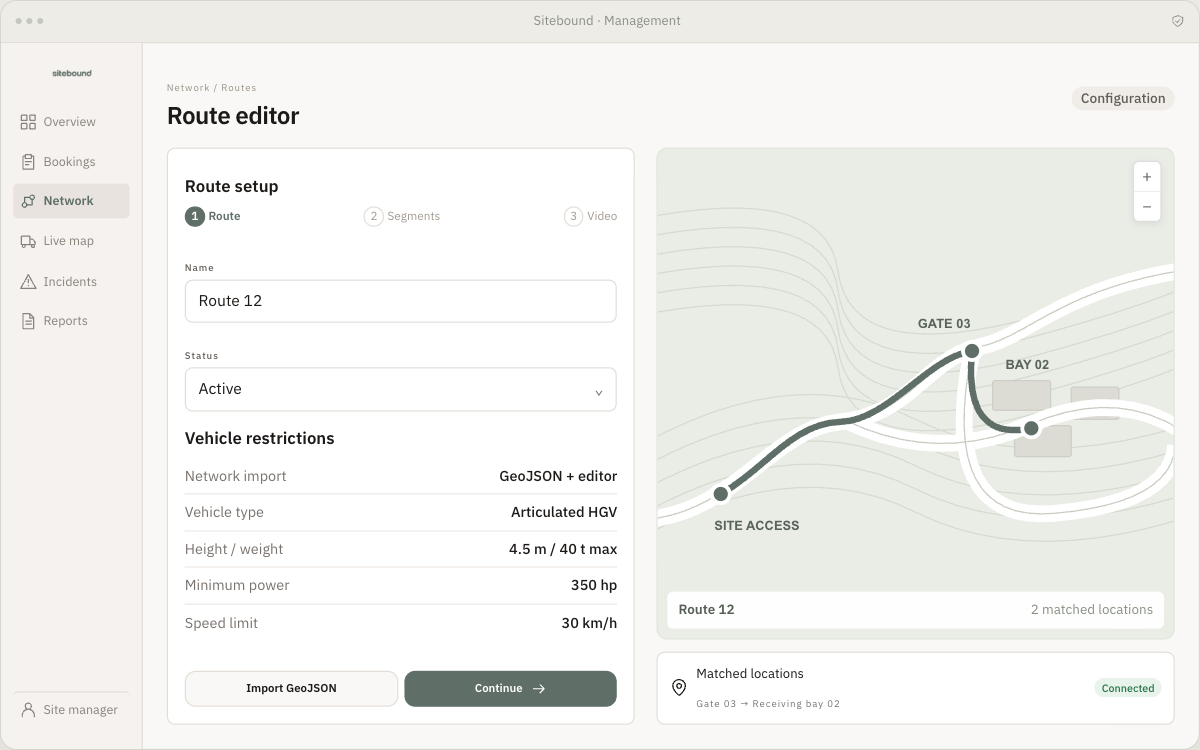
Build a route network around your site’s roads and operating limits. Sitebound brings vehicle requirements, checkpoints and available capacity into the delivery plan.
The route planning workspace, showing roads, matched locations and vehicle restrictions.APP PREVIEW · EXAMPLE DATA
01
Import or create your site’s road network
Map the roads that deliveries can use and connect them to gates, checkpoints and receiving locations. Maintain one network for the project, so booking and operational teams work from the same route information as the driver.
02
Set limits that reflect the vehicle and the road
Restrict roads by vehicle type, dimensions and horsepower requirements, and set route speed limits. Use those specifications when planning a suitable journey. The site team defines and maintains the operating limits; drivers receive the route and instructions relevant to their booking.
03
Plan checkpoints, layovers and available slots
Add checkpoints for inspections or layovers, define capacity and generate time slots. Apply vehicle and operating-time restrictions, then coordinate these checkpoints with the receiving location. Planning the complete route helps prevent a bottleneck at a gate from becoming a conflict at the bay.
IN PRACTICE · AN EXAMPLE WORKFLOW
A closure does not suit every alternative route.
When a road becomes unavailable, report the incident from the driver app or add a closure in the dashboard. Identify the affected deliveries and coordinate rerouting and rescheduling. Match alternatives to vehicle specifications and available capacity before sharing revised routes and arrival windows with the teams involved.
A little more detail.
Can different vehicle types use different roads?
Yes. Road restrictions can reflect vehicle types and specifications, so route planning can account for the vehicles permitted to use each part of the site network.
What happens if there is no suitable alternative?
An alternative needs to meet the vehicle requirements and have available capacity. The team can review affected bookings and coordinate a revised plan; a closure does not mean every delivery can immediately be rerouted.