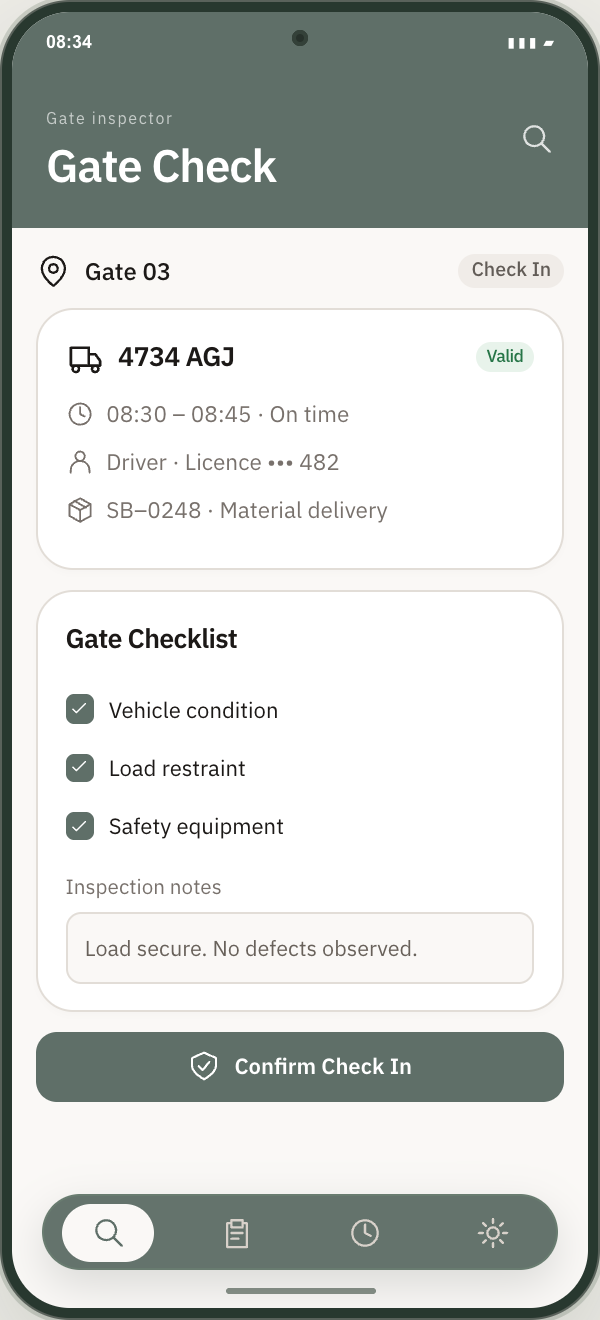
Give gate and checkpoint teams the delivery information they need on a phone. Match the arrival to the booking and record the checks before it moves further into the site.
The gate inspector app with the expected delivery and its driver, vehicle and load checks.APP PREVIEW · EXAMPLE DATA
01
Check the right person, vehicle and load
Use the expected booking to check the driver, licence, vehicle registration and materials. The inspector can compare the arrival with the delivery details in one app, keeping the checks linked to the booking instead of on a separate paper list.
02
Make the checkpoint’s requirements clear
Complete configurable inspections and record their status. Different checkpoints can serve different purposes, from gate entry to a layover or a further inspection. Keep each checkpoint’s requirements visible to the people responsible for carrying them out.
03
Keep arrival information moving through the site
Check the expected arrival window and record entry and exit events. Updated arrival estimates and inspector notifications connect the gate to the next checkpoint and the receiving team, helping them prepare for the delivery that is actually on its way.
IN PRACTICE · AN EXAMPLE WORKFLOW
An arrival that differs from the booking.
A lorry arrives for its allocated slot, but the inspector finds a different vehicle registration. The booking provides the expected information for comparison. The team records the inspection status and coordinates the next step with the delivery team, keeping a traceable record of the check.
A little more detail.
Do gate inspectors have a mobile app?
Yes. The gate and checkpoint inspector app brings booking details and inspection checks together on a phone for teams working at the point of arrival.
Are gate checks included in the delivery history?
Yes. Inspection status and entry and exit events stay connected to the delivery, alongside the journey and the receiving record.